Music Player- Music,Mp3 Player
- 4.7
- Rating
- 10.00M
- Installs
- Free
- Price

 Analysis by App-foxy
I usually judge a music player by what happens between choosing a song and actually hearing it. Can it find the tracks I already keep on my phone? Does playback feel uncomplicated when I am walking, commuting, or trying to settle into work? And does it stay out of the way instead of turning a simple listening session into account setup and discovery screens? Music Player- Music,Mp3 Player, from iJoysoft, takes that straightforward route. It is a free Android music and audio app designed for browsing and playing local music, and my overall impression is that it works best for people who want a practical player rather than a full streaming service.
The app has been available since July 31, 2018, and its current version is 5.8.3. It is rated for Everyone and requires Android 6.0 or later, which makes it accessible to a wide range of Android phones. Its popularity is easy to understand: it has passed 10 million installs, with a 4.7 average from around 166 thousand ratings. Those figures do not automatically make it perfect, but they do suggest that its simple approach matches what many listeners want.
From a phone full of songs to a usable listening routine
I look at the shift from a phone packed with tracks to a listening routine that feels easy to repeat. A useful first step is deciding which albums or groups of songs you reach for in specific moments, then keeping their file information organized so browsing stays straightforward. That small bit of preparation also makes it easier to tell whether a local player fits your habits better than a streaming-first option.
You May Also Like

 Blood Strike: 2.5 Anniversary
Blood Strike’s Loadouts Turn Every Drop Into a Tactical Gamble
A close look at Blood Strike’s custom loadouts: how fast access to signature weapons reshapes its battle royale rhythm, rewards preparation, and narrows the gap between fights.

 Pandora - Music & Podcasts
Pandora’s Music Is Easy to Start, but Harder to Recover
Pandora’s strength is its low-effort path from a seed to a station. Its weak spot is how much confidence it asks you to place in connection, setup, and quiet recovery.

 8 Ball Pool
 Is Built on Rivalries, Rematches, and Routine
A close look at the rivalries, rematches, shared routines, and unanswered safety questions that turn a quick pool match into a persistent mobile community.

 Samsung Music
’s Quiet Strength Is Playing What You Already Own
Its reach comes less from spectacle than from dependable access to a personal library. That simplicity is both the app’s strongest retention engine and its ceiling.

 AccuWeather: Weather Radar
AccuWeather Review: A Quick, Clear Forecast for Everyday Decisions
For everyday plans, the best forecast is the one you can understand quickly. AccuWeather makes rain timing, radar, and local conditions easy to act on, with a few trade-offs.

 Hill Climb Racing
Why Hill Climb Racing Still Turns Crashes Into One More Run
A tiny car, a bumpy hill and one more upgrade: Hill Climb Racing keeps resurfacing because its simple chaos makes every near-miss feel personal.
More From Our News Desk
View All News


Starting with the music already on your device
The most natural starting point is a phone that already contains MP3 files or other music saved for offline listening. Perhaps you copied albums from a computer, downloaded tracks through a legitimate service, or transferred a personal collection to a memory card. In that situation, I do not want another subscription catalog. I want an app that can help me locate the music and start playback without making me rebuild my library.
That is where this player makes sense. Its purpose is local listening, so the first useful question is not “What should I stream?” but “Where are my songs, and how do I want to browse them?” The experience is centered on moving through the music stored on the device. That makes it a particularly sensible choice for flights, areas with unreliable reception, limited mobile data plans, or anyone who prefers to keep a personal collection available without depending on a network connection.
A practical preparation step is to clean up the collection before blaming the player for a messy library. Consistent artist and album names, sensible file names, and complete track information make browsing much easier. If a collection has vague tags or several versions of the same song, any local player can feel disorganized. I found that this kind of housekeeping matters more here because the app is a playback tool, not a service that automatically fills gaps with editorial recommendations.
The first handoff: storage to library
The important handoff happens when files move from phone storage into the app’s view of the collection. A music player cannot make badly arranged folders feel magically curated. If a song appears under an unexpected artist or album, the underlying file information is often the first place I would investigate. This is a useful distinction: the application can make access convenient, but it does not replace the work of maintaining a personal library.
For a small collection, browsing is likely to feel immediate and uncomplicated. With a large collection, I would approach it in stages rather than tapping around randomly. I would first look for the broad grouping that matches my intention, then narrow the choice to an artist, album, or individual track. That workflow is faster than repeatedly scrolling through one enormous list, especially when I am choosing something quickly while leaving the house.
One non-obvious advantage of a local player is predictability. A streaming app may change its recommendations, require an active account, or show music that is unavailable in a particular region. Here, the handoff is more direct: the files I have prepared are the files I can browse. The trade-off is equally clear. If I want a song that is not already on the phone, this app is not a replacement for a streaming catalog or a music purchasing service.
Choosing the right route through the library
I would use different browsing habits for different situations. When I know the exact track, searching or moving directly through the song list is the obvious route. When I want a complete listening session, starting from an album or artist is more natural because it preserves some structure. When I am doing routine work, I would prepare a group of familiar tracks in advance rather than spending time making decisions one song at a time.
This is also where the app’s simplicity can be helpful for less technical users. A family member who only wants to play music saved on an Android phone may find a dedicated player easier to understand than a feature-heavy service built around online discovery. The Everyone content rating supports that broad audience, although the actual comfort of using it still depends on how tidy the phone’s music collection is.
I would not treat the app as a music-management system. It is better to think of it as the listening layer that sits on top of files already present. If you need elaborate collection editing, cloud synchronization, collaborative playlists, or a constantly changing library, another category of app will probably suit you better. The strength here is reducing the distance between local music and playback, not expanding the role of the application into every part of a music ecosystem.
Playback as the main outcome
Once I select a song, the desired outcome is deliberately modest: the track should play, and I should be able to continue listening without unnecessary interruption. That sounds basic, but it is exactly why a dedicated music player remains useful. I can use it for a personal album during a train ride, background music while cooking, or a carefully selected group of offline tracks during a workout where I do not want to handle a streaming app.
My preferred workflow is to choose the music before the situation becomes busy. For example, before leaving for a long journey, I would confirm that the albums I want are stored locally, open the player, and start with a known track. That small preparation avoids the common problem of discovering halfway through a trip that the music I expected to use is only available online. The app is most valuable when it supports that kind of dependable routine.
The result is also less distracting than a service focused on recommendations. I am not opening it to browse endless new releases; I am opening it to listen to something I have already chosen. For people who find streaming interfaces visually crowded or who dislike being pushed toward more content, that narrower purpose can feel refreshing.
Where it sits beside the usual alternatives
Compared with a streaming platform, this player offers a different bargain. Streaming services are better when I want discovery, synchronized catalogs, curated playlists, or access to music I do not own locally. They usually make it easier to move from one artist to another without preparing files first. This app is better when I value offline control and already have the tracks I want.
Compared with a phone’s built-in player, the appeal is having a separate music-focused space instead of relying on whatever playback tools the manufacturer included. That can be useful when the default app is cluttered with other media or does not present a personal collection in the way I prefer. Still, I would not switch automatically. If the built-in player already handles my library cleanly, supports my listening habits, and avoids advertising or extra prompts I dislike, the benefit of changing may be limited.
Compared with a specialized audiophile player, this is the more approachable option. A specialist tool may offer deeper audio controls, unusual format support, detailed tagging, or advanced library rules. Those extras can matter to serious collectors, but they can also make ordinary playback feel overengineered. Music Player- Music,Mp3 Player is aimed at the person who wants to get to the song rather than tune every part of the playback chain.
Small habits that improve the experience
My first practical tip is to separate “finding music” from “maintaining music.” Use this app for listening, but organize files and correct tags when you have time. Trying to repair a chaotic collection while you are already in a hurry leads to frustration and makes the player seem less capable than it is.
My second tip is to create a repeatable pre-trip routine. Before going offline, check that the intended tracks are truly stored on the device, then open the app and begin playback once while you still have time to adjust the selection. This is more reliable than waiting until a poor signal makes it difficult to troubleshoot the collection.
A third useful trade-off is to keep separate listening groups by purpose, even if the app itself is not being used as a sophisticated playlist manager. I might keep workout music, quiet background albums, and travel favorites in clearly organized folders or with consistent tags. That reduces browsing time and turns a general collection into a few dependable routes to the right mood.
I would also avoid judging the app only by its first screen. The real test is the complete handoff: files need to be present, the library needs to be understandable, the chosen track needs to be easy to reach, and playback needs to remain convenient after the first song. When those parts line up, the app feels much more useful than its short “Music Player” label suggests. When they do not, the problem may be the collection itself rather than the playback screen.
Where the workflow breaks
The biggest limitation is the boundary between local playback and online music discovery. If your daily listening depends on searching for unfamiliar artists, receiving recommendations, following new releases, or accessing a large subscription catalog, this app will feel narrow. It does not replace the reason many people use streaming services in the first place.
The second friction point is library quality. A phone filled with duplicate files, inconsistent album names, missing artwork, or incomplete artist information can be difficult to browse. A dedicated player gives you a place to listen, but it cannot guarantee that every imported file will be displayed exactly as you imagine. Users with large collections should be ready to spend some time organizing their music outside the listening session.
There is also a difference between “free” and completely without commercial considerations. The app is free to install, while in-app purchases range from $0.99 to $9.99 per item. That is worth keeping in mind if you prefer an entirely uninterrupted experience or want to understand how the free version fits into your routine before committing to any optional purchase. I would start with ordinary daily use and decide whether the available experience justifies spending anything.
Another reason to skip it is if your priorities are advanced audio customization, cloud-based synchronization across several devices, or a carefully managed cross-platform library. Those needs point toward a more specialized solution. This is an Android app requiring Android 6.0 or later, so it is not the natural choice for someone who wants one identical music workflow across Android, iOS, desktop, and other platforms.
Who should use it, and who should look elsewhere
I would recommend it to Android users with a local MP3 collection who want a direct path from stored files to playback. It is especially suitable for offline listening, personal albums, simple background music, and situations where mobile data or network availability is uncertain. Its free entry point also makes it easy to test without treating the decision like a major purchase.
I would be more cautious for people who do not already have music saved on their phone. The app can be useful after the collection is ready, but it is not the best answer to the question of where to discover and obtain a broad catalog. Likewise, listeners who expect elaborate playlist collaboration, cloud continuity, or studio-style control should look at alternatives built around those functions instead.
The developer, iJoysoft, has kept the product focused enough that the main experience is easy to understand: locate personal music and play it. Its strong average rating and large install base show that this focused approach has broad appeal, but popularity should not hide the central compromise. The app is strongest when your music is already yours and already on the phone.
After using it as part of a realistic start-to-finish routine, I see Music Player- Music,Mp3 Player as a practical companion rather than a complete music universe. It helps turn a prepared local collection into something convenient to browse and hear, and it avoids the obligations that come with a streaming-first service. The handoff from storage to listening is its real value.
My final recommendation is simple: install it if you want a focused Android player for music you already keep locally, especially for offline routines and uncomplicated playback. Skip it if discovery, synchronization, or advanced audio tools matter more than direct access. For the right listener, its restraint is a strength; for everyone else, a broader music platform will be the better route.
FAQs for Music Player- Music,Mp3 Player
01What is Music Player- Music, Mp3 Player, and what can it do?
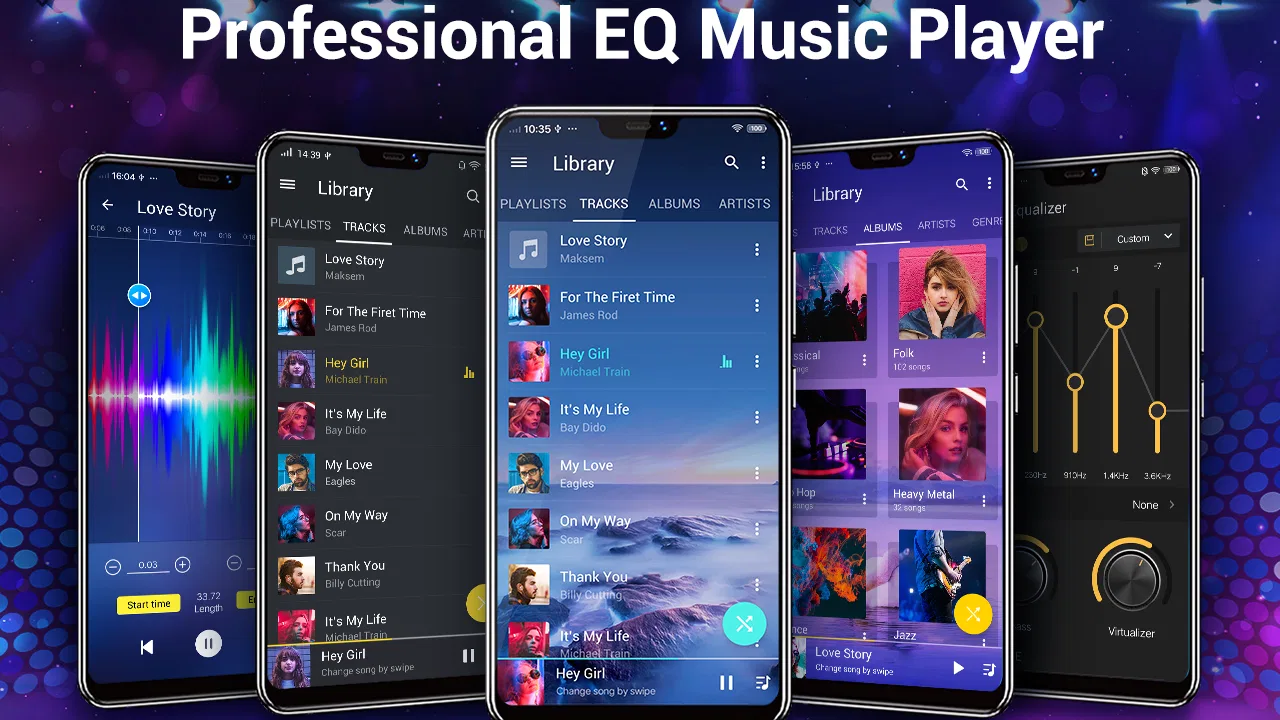
Music Player- Music, Mp3 Player is an Android audio player designed for listening to locally stored songs and MP3 files. After testing its main features, I found it useful for organizing music by songs, albums, artists, and playlists. It generally focuses on straightforward playback rather than music streaming, so it is best suited to users who already have audio files saved on their device.
02Can I use Music Player- Music, Mp3 Player without an internet connection?
Yes, the app is primarily intended for playing music files that are already available on your phone, which means an internet connection is usually not required for basic playback. This makes it convenient for travel, commuting, or areas with poor coverage. However, any optional online features, advertisements, updates, or external content may require mobile data or Wi-Fi.
03What audio formats does Music Player- Music, Mp3 Player support?
The application is mainly optimized for common music formats such as MP3, although compatibility can depend on the Android device and the specific file encoding. In my experience, standard MP3 files are the safest choice for reliable playback. If a song does not appear in the library, checking the file location, storage permissions, filename, or format can often resolve the problem.
04Does Music Player- Music, Mp3 Player include playlists, equalizer controls, or background playback?
The app provides the essential tools expected from a mobile music player, including playlist management and playback while using other applications. Depending on the installed version and device, it may also offer features such as shuffle, repeat, a sleep timer, equalizer presets, or lock-screen controls. Because features can change through updates, it is worth checking the current listing before downloading.
05Is Music Player- Music, Mp3 Player free, and are there advertisements or privacy concerns?
Music Player- Music, Mp3 Player can generally be downloaded and used without an upfront purchase, but the free experience may include advertisements or optional paid features. Before installing, review the app’s current Google Play listing for in-app purchase details and requested permissions. Pay particular attention to storage or media access, since those permissions are necessary for scanning and playing your personal music files.
Pros
- Supports common audio formats
- including MP3
- WAV
- AAC
- and FLAC.
- Simple interface makes browsing songs
- albums
- and artists straightforward.
- Playback controls remain accessible from the notification panel and lock screen.
- Useful playlist tools help organize music for different moods or activities.
- Can play downloaded tracks without requiring a constant internet connection.
Cons
- Some advanced features may be limited or unavailable without in-app purchases.
- Audio quality can vary depending on the original file and device hardware.
- Large music libraries may take time to scan and organize initially.
- May include advertisements that interrupt the listening experience.
- Battery usage can increase during long playback sessions with extra visual effects.

Music Player- Music,Mp3 Player
Gallery